A disaster with my Digitrax Zephyr Express meant I had to ship it to the factory in December for repairs with no firm return date. 😬
What should I do? Build a DCC-EX Command Station? I had the parts1. This had been my intent all along. But at the time, I lacked confidence, punted, and bought the Digitrax. An opportunity to correct a mistake?
The command station is built around an ESP32 WROOM Arduino UNO compatible board with built-in WiFi
I followed DCC-EX's instructions. They're thorough. And include workarounds to the bugs on the Espduino board. Everything came together as intended. Then I uploaded the software using EX-Installer.2 Easy-peasy.
The motor driver shield with 2x 1-1.5 A channels to drive main and programming tracks. Workarounds are visible from pins bent out from the side and jumper wires in the headers.
The combination of the 2 boards is smaller than my mouse. The cables are the power and track connections.
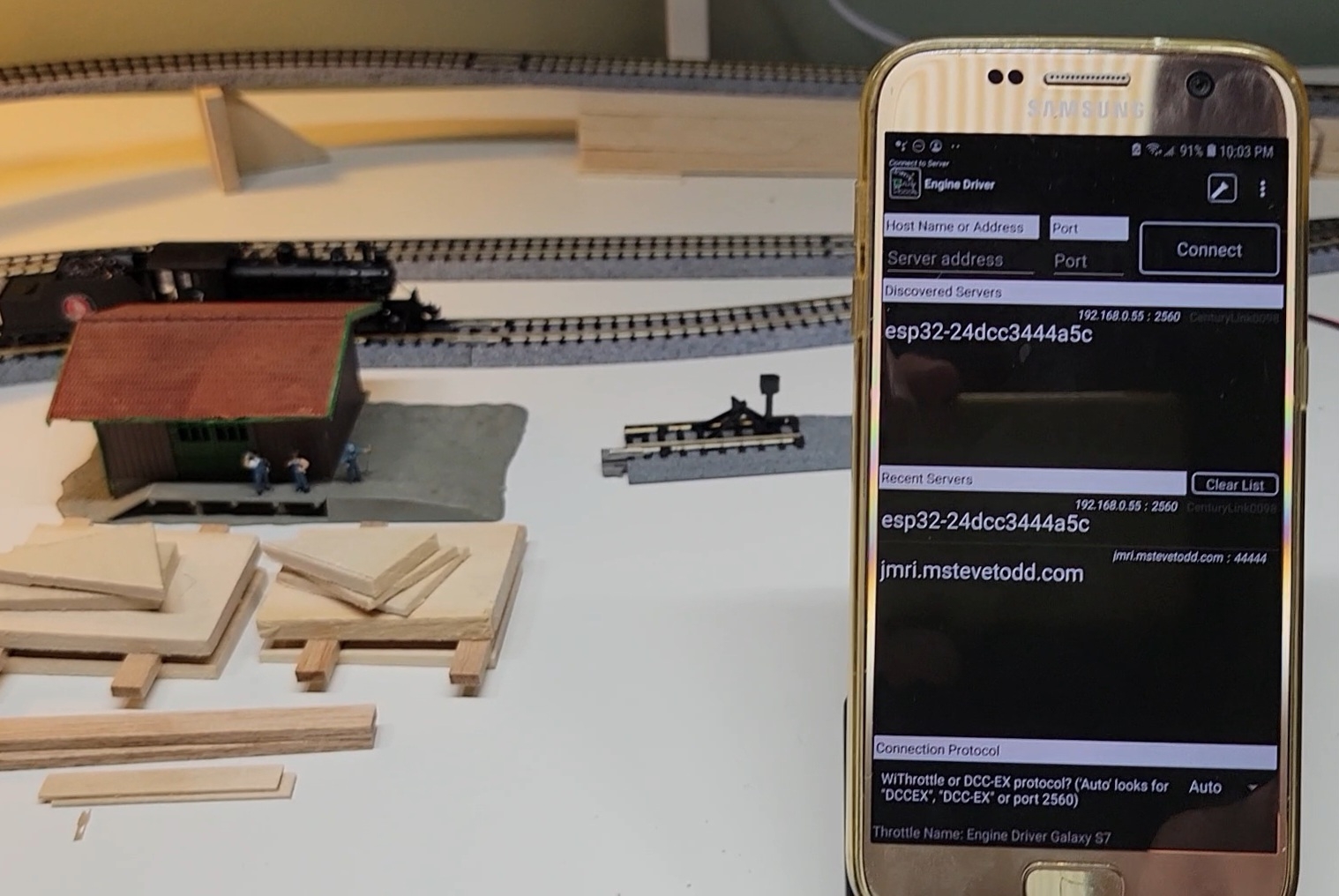
Once the command station was assembled, I fired up Engine Driver3, a mobile phone app, to serve as throttle and user interface. And before you could say Casey Jones, I was wirelessly running trains and switching turnouts with a repurposed 2015 cellphone! Cool!!!
Engine Driver fired up on my 10 year old Samsung.
The main throttle page showing my two locos selected from the DCC-EX loco roster.
Another cool thing about the DCC-EX Command Station is its EXRAIL train automation scripting. It's built-in and straightforward. The video below shows a first attempt. Train automation is one of my model train Holy Grails. So I guess there is a silver lining to bricking the Digitrax. Thanks for reading.
Everything about building the command station - board recommendations, DCC-EX software, documentation, its functionality and capability, the throttle software, etc. - worked like a champ. Thank you DCC-EX and Engine Driver teams for really excellent products!
Details
Automation. Great Northern #7 is dispatched. It's pulling a Great Northern red caboose. It makes a bit more than a circuit, huffing, whistling, and belling, afterwhich New York Central #1906 sets off in pursuit, hauling some cut lumber. After a few circuits, NYC #1906 catches its prey and retires. GN #7 carries on for another lap finishing roughly adjacent to its companion. There are no sensors (yet). The two locos were crudely speed characterized with the automation script relying on that data for timing.
Layout. Kato Unitrack. One double crossover and two power routing #6 turnouts switched by a track signaled and powered Digitrax DS74.
Throttle. Engine Driver connected via home internet and the WiThrottle server built into the DCC-EX Command Station. It controls the locos, the turnouts, and initiating routes and automation.
Trains. Both locos are Bachmann ALCO 2-6-0's made circa 2013 and are supposed to represent prototypes from roughly1898 and 1923. NYC #1906 is NOS with a simple 2 function (speed and headlamp) DCC factory decoder installed. GN #7 was purchased used and the previous owner installed an aftermarket ESU LokSound 5 Sound and DCC decoder. Both rolling stock are used MicroTrains cars.
Katherine and I had a really nice day hike yesterday from Sunrise to Fremont Lookout. We initially planned on Burroughs, but rather than negotiate snow on the trail, we headed north to the Lookout, our first hike there. From Fremont Lookout We left Seattle around 8:30, arrived at Sunrise 2 hours later and were on the trail a half hour after arrival. A spectacular clear day with a nice breeze that kept temps cool; it was over 90 in Seattle. Lots of fellow day hikers, but not unbearable. Katherine packed an ample picnic lunch, much of which was packed back down the trail. From Fremont Lookout The view from the Lookout was great. To the north was Mt Baker, Mt Shuksan, Glacier Peak and others. Looking west we could see the skylines of Seattle and Bellevue. Looking east we could see the lift towers of Crystal's Campbell and Rex chairs. Lots of climbing parties - ascending and descending - could be seen on Rainier with binoculars. This is an easy day hike. The visitor maps put the dis...
This post takes a look at the ILS (I Love Sushi head race series in Seattle) Mixed 2x Smackdown 2023 edition and considers the question of how well the US Rowing handicap adjusts for age in this 5.2K race. Course description The start was off the Pocock dock with crews heading east under the University Bridge into Portage Bay. The course continues tight along the houseboats until the "Diabolical Turn", close to the Seattle Yacht Club. A miscue on this turn can cost lengths or worse. The course continues east through the Montlake Cut to Fox Point. The Big Turn (180˚+) begins at the navigation buoy off port at Fox Point and continues until crews are pointed back at the Cut. Another opportunity to lose lengths and to hit things. The line to the finish follows the shoreline with a slight turn to starboard and ends at Fritz Hedges Park, approximately 5.2 km from the start. The competition 26 c...




Comments
Post a Comment